AI Reports & Data Chat
Ask your Linnworks data anything in plain English. Get answers, charts, and pre-built reports — without writing a single query.
1. Overview
AI Reports & Data Chat is an embedded Linnworks app that turns your Linnworks order, stock, customer, and channel data into instant answers and reports — through natural-language chat and a library of pre-built AI-generated reports.
Instead of exporting CSVs, building pivot tables, or asking your tech team to write SQL, you ask:
1. ORC-RED-12 — 487 units (£4,382 / $5,521)
2. ORC-WHT-10 — 412 units (£3,295 / $4,152)
3. POT-CER-8 — 389 units (£2,725 / $3,433)
4. PLT-IND-XL — 356 units (£3,917 / $4,935)
5. SAU-COL-6 — 298 units (£1,491 / $1,879)
Want this as a chart, or the equivalent figures for revenue rather than units?
That's it. No queries, no spreadsheets — just answers in seconds.
What makes it different: AI Reports is powered by Claude (Anthropic's frontier AI model) connected directly to your live Linnworks data via our purpose-built integration layer. Answers reflect your data, not generic SaaS templates.
2. Who it's for
AI Reports & Data Chat is built for Linnworks merchants who:
- Spend hours each week building reports manually from CSV exports.
- Run multi-channel operations and need quick cross-channel insights without juggling tools.
- Want answers to one-off questions ("why did Tuesday's revenue drop?") without setting up a permanent report.
- Are not technical but want the power of data analysis without the learning curve.
- Need to share reports with non-technical stakeholders (founders, board, suppliers).
3. How it works
AI Reports & Data Chat runs as an embedded screen inside Linnworks. There's no separate dashboard.
Under the hood:
- You type a question (or open a pre-built report).
- The app's secure backend translates the question into structured queries against the Linnworks API.
- The Linnworks API returns your raw data — orders, stock, customers, channels, refunds.
- The data is fed to Claude (an AI model running on Anthropic's API) along with your question.
- Claude synthesises the answer in natural language, with figures, summaries, and chart suggestions.
- The result appears in your chat thread.
Your data is never used to train AI models. Anthropic does not use API data for training. See Data & privacy for full details.
One important rule: AI Reports is for analysis and reporting only. It does not modify your Linnworks data — no orders are created, no stock is adjusted, no customers are edited by this app. It is fundamentally read-only.
4. Installation
Installation takes about 60 seconds. You'll need:
- An active Linnworks merchant account.
- Permission to install applications (account owner or admin).
-
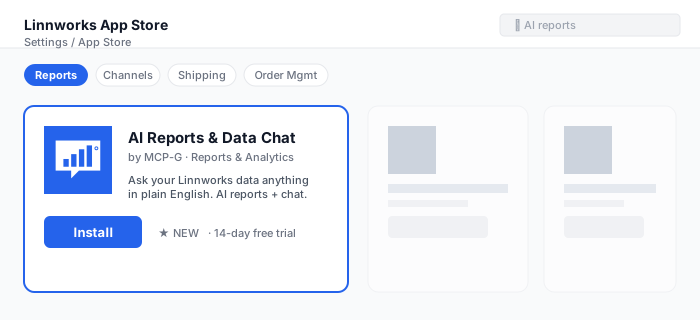
Find AI Reports & Data Chat in the Linnworks App Store
From Linnworks, go to Settings → App Store and search for AI Reports (or Data Chat). Or visit apps.linnworks.net directly.
-
Click Install
Authorise the app. We request these permissions:
- Orders (read) — to answer questions about your orders, channels, revenue.
- Inventory (read) — to answer questions about SKUs, stock, products.
- Customers (read) — to answer questions about your customer base.
Note: we do not request write permissions. The app is read-only.
-
Open the app
AI Reports appears under Apps → AI Reports & Data Chat in your Linnworks menu [VERIFY exact location].
-
Start your 14-day trial
The first time you open the app, you'll be prompted to start your free trial. No card details required.
-
First sync
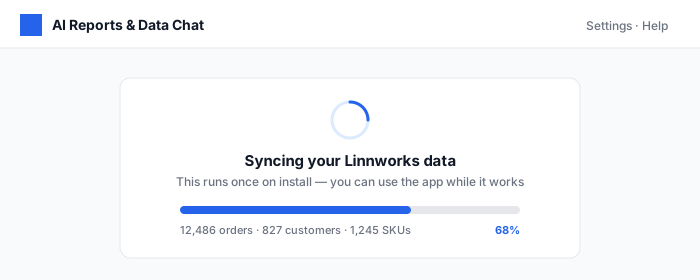
On first open, the app pulls a recent slice of your Linnworks data (typically the last 90 days) into a secure cache. This makes responses fast. The sync runs in the background — you can start using the app immediately.
5. Your first data question
The chat is the heart of the app. Type a question and press Enter.
Beginner-friendly starter questions
Not sure where to begin? Try one of these — they work for any Linnworks data:
- "How many orders did I process yesterday?"
- "What's my best-selling product this month?"
- "Compare revenue this week vs last week."
- "Which channel grew the most last month?"
- "Show me customers who've ordered more than 5 times this year."
- "What's my average order value broken down by channel?"
- "List SKUs that haven't sold in the last 90 days."
- "How is my stock for SKU ORC-RED-12 trending?"
Follow-up questions work
The chat remembers context. After asking "What's my top-selling SKU this month?", you can simply ask "How did it do last month?" — the AI knows what "it" refers to.
6. Pre-built AI reports
Alongside the chat, AI Reports ships with a library of one-click reports that auto-generate using your data. Each is rendered by Claude with a written summary, key figures, and trend commentary.
| Report | What it shows | Refresh |
|---|---|---|
| Daily briefing | Yesterday's orders, revenue, top SKUs, top channel, anomalies | Every morning at 08:00 UK |
| Weekly review | Week-over-week comparison; biggest movers; what to investigate | Monday 09:00 UK |
| Monthly summary | Full month performance; channel mix; cohort behaviour | 1st of each month |
| Stock-out risk | SKUs likely to run out within 14 days at current sales rate | Daily, 08:00 UK |
| Slow movers | SKUs with little or no movement in the last 60 days | Weekly, Monday |
| Channel performance | Per-channel revenue, AOV, return rate, growth | On demand |
| Customer cohorts | Cohort retention, repeat purchase rates, top-spending customers | On demand |
| Refund & return analysis | Refund rates by SKU, channel, reason; trend over time | On demand |
[VERIFY: confirm the exact list of pre-built reports shipping at launch.]
Each report can be emailed automatically (Pro and Scale plans) — see the report's Schedule email button.
7. Asking great questions
The AI is very capable, but a few habits will get you better answers, faster.
Be specific about time
Instead of "how are sales?", try "how were sales for the last 7 days vs the previous 7 days?". The AI handles "last week", "month-to-date", "year-to-date", "Q1", "since 1st March", etc.
Name what you want to compare
"Top 5 products by units" — or by revenue, by margin, by growth rate. Be explicit. AI defaults to units when unspecified.
Ask for a chart explicitly
Add "…as a bar chart" or "…as a line over time" to your question and a chart is rendered alongside the answer.
Combine filters naturally
"Show me Amazon UK orders over £100 in the last 30 days, grouped by SKU" works perfectly. Multiple filters in one sentence are fine.
Ask for explanations
After any answer, you can say "why?" or "what drove that?". The AI will look at the underlying data and try to explain the change.
What it can't (yet) do
- Predict the future with statistical confidence intervals — you'll get a forecast, but it's a heuristic estimate, not a regression model.
- Modify your Linnworks data (intentional — see how it works).
- Pull data from outside Linnworks (e.g. Google Analytics, Shopify directly). [VERIFY: roadmap item.]
8. Exporting & sharing
Export individual answers
Each chat answer has an Export button. Choose:
- CSV — the raw data behind the answer
- PDF — the full formatted answer (chart included)
- Copy as Markdown — useful for pasting into Notion, Slack, email
Schedule reports by email
Any pre-built report can be scheduled to email itself to you (or your whole team) on a cadence:
- Daily, weekly, monthly
- To one or many email addresses
- Optionally with PDF attachment
Share a chat thread
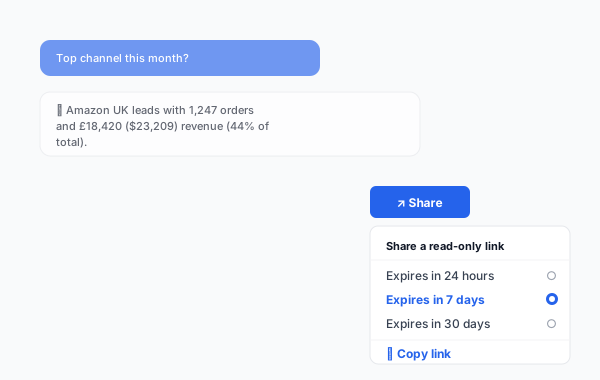
Click Share on any thread to generate a read-only link that anyone with the link can view (no Linnworks login required). Links can be set to expire after 24 hours, 7 days, or 30 days.
9. Usage limits & the token meter
AI usage is metered to ensure fair pricing and to protect you from runaway costs.
What's a "chat turn"?
One chat turn = one question from you + one answer from the AI. Pre-built reports also each count as 1 turn (per generation).
Plan limits
| Plan | Chat turns / month | Pre-built report runs / month |
|---|---|---|
| Free trial | 50 | Unlimited (capped during trial) |
| Starter | 200 | 5 per week |
| Pro | 1,500 | Unlimited |
| Scale | Unlimited (fair-use) | Unlimited |
What happens at the limit
- At 80% of your monthly allowance, you'll receive an email warning.
- At 100%, the chat is paused for the rest of the billing month. Pre-built scheduled reports continue.
- You can top up extra turns at £0.10 ($0.13) per turn at any time from Billing → Top up.
Usage dashboard
Open Settings → Usage at any time to see chat turns used this month, projected month-end, and a history of past months.
Tip: Pre-built reports are the most cost-efficient way to use the app — one run answers a question that might take 5+ chat turns to explore manually. Lean on them.
10. Pricing & plans
All plans start with a 14-day free trial. No card details required to start.
| Plan | Monthly | Annual (saves 2 mo) | Best for |
|---|---|---|---|
| Free trial | £0 ($0) | — | 14-day evaluation |
| Starter | £29 ($36) | £290 ($365) | Single user, light usage |
| Pro | £79 ($99) | £790 ($994) | Most merchants — recommended |
| Scale | £249 ($313) | £2,490 ($3,134) | Multi-user teams, heavy usage, dedicated support |
What every plan includes:
- Natural-language data chat
- All pre-built AI reports
- Export to CSV, PDF, Markdown
- Email reports
- Email support
Pro adds: unlimited pre-built reports, custom report builder, shareable thread links, priority support, scheduled email delivery.
Scale adds: unlimited chat (fair-use), Slack support, 4-hour SLA, dedicated onboarding session.
Billing. Payments via Stripe. We never see card details. Cancel any time.
Refunds. 30-day money-back guarantee.
VAT. Prices exclusive of VAT. UK customers charged 20%; EU B2B with valid VAT number reverse-charged.
11. Troubleshooting
The AI says "I don't have that data"
By default the app caches the last 90 days of data for speed. If you ask about older data, the AI will fetch it live from Linnworks (this takes a few extra seconds). If Linnworks doesn't have the data either (e.g. very old archived orders), the AI will tell you honestly.
An answer looks wrong
- Click the Show data link below the answer to see the raw rows the AI used.
- If the underlying rows look wrong, the issue is likely in Linnworks itself (e.g. miscategorised channel).
- If the underlying rows look right but the AI summarised them incorrectly, please click Report on the answer — this sends the conversation to our team for review (anonymised).
The chat is paused — out of turns
You've hit your monthly plan limit. Two options:
- Top up extra turns at £0.10 ($0.13) per turn from Billing → Top up.
- Upgrade plan from Billing → Plan.
A scheduled email report didn't arrive
Check your spam folder first (Resend, our email provider, has high deliverability but occasional false positives happen). If still missing, open Settings → Scheduled reports and verify the schedule is enabled and the recipient address is correct. The history log shows whether each send was attempted.
The app is slow
Most answers complete in 3–8 seconds. If you're consistently seeing more than 15 seconds, check our status page — there may be an upstream incident with Linnworks or Anthropic. If status is green, please contact support.
12. Data, privacy & AI
What we store
- A cached copy of your Linnworks data (orders, stock, customers, channels) for fast querying. Capped at the most recent 365 days; older data fetched on demand.
- Your chat history (so threads persist between sessions and you can scroll back).
- Your subscription / billing record (via Stripe).
What we don't store
- Linnworks session tokens are not persisted — held in memory only during a request.
- Card details are not stored — all payment data is held by Stripe.
How AI uses your data
When you ask a question:
- Your question + the minimum relevant slice of your data is sent to Anthropic's Claude API over a TLS-encrypted connection.
- Claude generates the answer and returns it to our backend.
- Our backend sends the answer to you.
Anthropic's commitment: data sent via the Claude API is not used to train Anthropic's models and is retained only for short-term abuse monitoring (typically 30 days, then deleted). See Anthropic's Commercial Terms and Privacy Policy.
Where data is stored
All cached data and chat history is stored in Cloudflare D1 and KV with EU data residency. Encryption at rest and in transit by Cloudflare.
GDPR
We are GDPR-compliant. You have the right to:
- Access the data we hold about you (request via privacy@mcp-g.com).
- Have your data deleted (within 30 days of uninstall, or immediately on request).
- Export your chat history at any time as JSON or PDF.
Our full Data Processing Addendum is available on request.
13. Uninstalling
- From Linnworks: Settings → App Store → My Apps → AI Reports & Data Chat → Uninstall.
- Your Linnworks session token is immediately revoked. The app stops fetching new data.
- Within 30 days, all cached data, chat history, and scheduled reports are permanently deleted.
- To request immediate deletion before 30 days, email privacy@mcp-g.com from your account email.
Before you uninstall: if you want to keep your reports or chat history, export them first from Settings → Export all.
14. Support & contact
| Plan | Channel | Response time |
|---|---|---|
| Starter | 1 business day | |
| Pro | Priority email | 4 hours (business hours, UK) |
| Scale | Slack + email | 4 hours (extended) |
General support: support@mcp-g.com
Privacy / GDPR: privacy@mcp-g.com
Status page: status.mcp-g.com [VERIFY: create this if not yet live]
15. FAQ
Does AI Reports work with multiple Linnworks accounts?
Yes. Install the app on each Linnworks account individually. Each account has its own cached data, chat history, and billing — there's no cross-account leakage.
Can I ask questions that span multiple channels?
Yes — cross-channel questions are the app's superpower. Ask things like "Compare Amazon vs eBay revenue this month" or "Which SKU sold best on each channel last week?" — fully supported.
Can the AI write to my Linnworks data?
No. The app is intentionally read-only. It does not request write permissions during install. This is a deliberate design choice to protect your data.
Which Claude model is used?
We use Claude Sonnet (Anthropic's balanced model) for most chat turns and pre-built reports, with Haiku (a smaller, cheaper model) for short summaries and routing decisions. Opus is used for complex analysis on Scale plans. We optimise the model choice on your behalf — there's nothing for you to configure.
Is my data secure?
Yes. Data is encrypted at rest (Cloudflare D1/KV) and in transit (TLS 1.3). Linnworks tokens are never persisted. Anthropic does not train on your data. Full details in Data, privacy & AI.
How current is the data?
Cached data refreshes every 15 minutes for orders, every hour for stock, and daily for customer records. You can force an immediate refresh from Settings → Refresh now.
Can I ask questions in languages other than English?
Yes, Claude supports many languages. The pre-built reports are in English at launch [VERIFY], but the chat itself accepts and answers in any major language.
What if my Linnworks data has errors? Will the AI catch them?
The AI surfaces patterns in your data and will sometimes flag oddities ("12 orders this week have £0 totals — worth checking"), but it does not validate or clean your data automatically. Garbage in, garbage out applies.
Is there an API or webhook for receiving reports programmatically?
An API for programmatic access is on the roadmap. Today, scheduled email and shareable links are the supported ways to share data externally. Contact support if you have a specific integration need.
Can multiple people use the same app installation?
Yes. Anyone with access to your Linnworks account can use the embedded app, with the same plan and limits. Chat history is shared across users on the same installation. Multi-user with separate histories is on the Scale plan roadmap [VERIFY].
Can I have the AI proactively alert me about something?
Yes — the Stock-out risk and Daily briefing reports are alert-style. You can also create custom alerts on Pro and Scale plans: "Email me if revenue drops more than 20% week-over-week."
16. Changelog
| Version | Date | Changes |
|---|---|---|
| 1.0.0 | 29/06/2026 | Initial public release on Linnworks marketplace. |